Is your Xbox Series X Ethernet port damaged, loose or no longer detecting a wired network connection?
The Ethernet socket on an Xbox Series X can become physically damaged if the console is dropped or knocked while a network cable is connected, if the Ethernet plug is pulled sideways, or if a damaged connector is repeatedly inserted into the socket.
Console Wizard provides a professional Xbox Series X Ethernet port repair and LAN socket replacement service for physically damaged network connections.
Our engineers remove the damaged Ethernet socket and replace it using a genuine Xbox Series X Ethernet port.
This repair is currently £99.99 and a successfully completed repair is covered by our standard 3-month warranty.
Common Xbox Series X Ethernet Port Problems
Your Xbox Series X LAN socket may require professional repair if you are experiencing:
• Ethernet cable no longer detected
• Damaged or bent pins inside the LAN socket
• Ethernet plug feels loose when connected
• Network connection drops when the cable moves
• Ethernet cable will not insert correctly
• LAN socket physically damaged
• Ethernet port pushed into the console
• Wired network stopped working after the console was dropped or knocked
If the Ethernet socket is visibly damaged, repeatedly inserting the network cable can potentially cause further physical damage.
Xbox Series X Ethernet Port Replacement
The Ethernet socket is an internal connection and replacing it requires the Xbox Series X to be professionally dismantled.
Our engineer gains access to the damaged network connection, removes the faulty Ethernet port and installs a genuine Xbox Series X replacement LAN socket.
The repaired connection is inspected before the console is reassembled and tested.
This provides a proper repair for a physically damaged network socket rather than attempting to straighten or temporarily reposition badly damaged internal contacts.
What Does Our Xbox Series X Ethernet Repair Include?
Our professional Xbox Series X Ethernet port repair includes:
• Professional Xbox Series X dismantling
• Inspection of the damaged Ethernet socket
• Removal of the faulty or damaged LAN port
• Genuine Xbox Series X Ethernet replacement port
• Professional installation and connection inspection
• Console reassembly
• Ethernet connection testing
• Final console functionality testing
• 3-month repair warranty
Genuine Xbox Series X Ethernet Port
We use a genuine Xbox Series X Ethernet port for this repair.
This ensures that the replacement socket is the correct type and fit for the Xbox Series X rather than adapting an unsuitable network connector.
Once installed, the Ethernet connection is tested before the console is returned.
Xbox Series X Ethernet Port With Bent or Damaged Pins
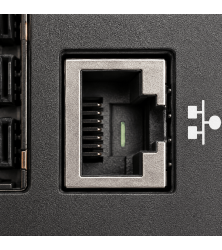
The Ethernet socket contains a series of small electrical contacts that connect with the contacts inside the RJ45 network plug.
If these contacts become bent, broken or physically damaged, the Xbox Series X may fail to detect the Ethernet cable correctly.
The console may report that no wired connection is present, or the network connection may become intermittent.
Where the internal contacts have suffered significant physical damage, replacing the Ethernet socket provides a more reliable repair than attempting to straighten badly damaged contacts.
Xbox Series X Not Detecting Ethernet Cable
If your Xbox Series X does not recognise that an Ethernet cable has been connected, a physically damaged LAN socket is one possible cause.
Typical symptoms can include the console continuing to use Wi-Fi despite an Ethernet cable being connected or reporting that there is no wired network connection.
If the socket is visibly damaged, loose or contains bent contacts, the physical Ethernet port may require replacement.
However, an Xbox Series X not connecting through Ethernet does not automatically mean the socket itself is faulty.
Network settings, the Ethernet cable, router equipment or an internal motherboard fault can potentially cause similar symptoms.
Check Your Ethernet Cable Before Booking a Repair
If there is no visible physical damage to the Xbox Series X LAN socket, we recommend testing the console with a different known-working Ethernet cable before booking a port replacement.
You can also try another LAN connection on your router or network equipment where possible.
If several known-working cables fail and the socket appears physically damaged, the Xbox Series X Ethernet port may require professional repair.
Replace Your Ethernet Cable After Port Damage
We recommend replacing your Ethernet cable after a physically damaged Xbox Series X LAN socket has been repaired.
If the original RJ45 connector was involved when the socket became damaged, the plug itself may also have suffered physical damage.
Continuing to use a damaged network plug with a newly replaced Ethernet socket could potentially damage the replacement port.
For this reason, using a new or known-working Ethernet cable after the repair is recommended.
Xbox Series X Ethernet Port Damaged After a Fall
An Ethernet socket can become damaged when an Xbox Series X is knocked or dropped while the network cable is still connected.
The connected RJ45 plug can act as a lever, transferring the force directly into the LAN socket.
This can cause:
• Bent internal Ethernet contacts
• Broken or distorted LAN socket
• Loose network connection
• Damage to the socket connections
• Ethernet port pushed into the console
If this has happened, avoid repeatedly moving or reconnecting the damaged cable because additional movement can potentially make the damage worse.
Wi-Fi Works but Ethernet Doesn't
An Xbox Series X can continue connecting normally through Wi-Fi while its wired Ethernet connection no longer functions.
If Wi-Fi works but the console cannot detect a known-working Ethernet cable, check the LAN socket carefully for bent contacts, physical damage or excessive movement.
A damaged Ethernet port can affect the wired connection without preventing the console from connecting wirelessly.
If there is no visible socket damage, further diagnosis may be required because the problem could be with the network cable, router, console settings or internal network circuitry.
Ethernet Socket or Xbox Series X Motherboard Fault?
Not every wired network problem is caused by a physically damaged Ethernet socket.
If the LAN port is visibly broken, bent, loose or damaged, replacing the socket may resolve the problem.
However, if the Ethernet socket is physically intact and the Xbox Series X still cannot communicate with the network, the fault may be elsewhere within the console's network circuitry.
If inspection shows that the Ethernet socket itself is not responsible for the problem, we will contact you and explain what has been found before carrying out any different repair.
Professional Xbox Series X Ethernet Socket Repair
Replacing a damaged Xbox Series X Ethernet port requires more than simply removing the external socket.
The console must be dismantled and the damaged connection professionally removed without causing unnecessary damage to the surrounding components or connections.
Console Wizard carries out component-level console repairs, allowing damaged ports and connectors to be professionally replaced rather than replacing larger assemblies unnecessarily.
After the replacement has been completed, the repaired Ethernet connection and console are tested before return.
3-Month Xbox Series X Ethernet Repair Warranty
A successfully completed Xbox Series X Ethernet port replacement receives our standard:
3-month warranty covering the original repaired fault.
The warranty covers the Ethernet port repair carried out by Console Wizard.
It does not cover subsequent accidental or physical damage.
Damage caused by inserting a damaged Ethernet connector, dropping the console or pulling or knocking a connected network cable would be considered new physical damage rather than a failure of the original repair.
Local Xbox Series X Ethernet Port Repair in Bolton
Looking for an Xbox Series X Ethernet port repair in Bolton?
Console Wizard provides professional Xbox Series X repairs from our repair centre at 517 Tonge Moor Road, Bolton, Greater Manchester, BL2 3BG.
Local customers can bring their Xbox Series X directly to us for professional LAN socket replacement.
No appointment is required during our normal opening hours.
UK-Wide Xbox Series X Ethernet Port Repair
You do not need to live near Bolton to use Console Wizard.
We provide Xbox Series X Ethernet port repairs to customers throughout the UK.
Customers outside the local area can send their console to our Bolton repair centre using our UK collection and delivery service.
The Xbox Series X is professionally repaired and tested before being returned to you.
Xbox Series X Ethernet Port Repair FAQs
Can you replace a broken Xbox Series X Ethernet port?
Yes. A physically damaged Ethernet socket can be professionally removed and replaced with a genuine Xbox Series X Ethernet port.
Why isn't my Xbox Series X detecting my Ethernet cable?
A damaged LAN socket or bent internal contacts can prevent the console from detecting an Ethernet connection. However, a faulty cable, network equipment, settings or an internal motherboard fault can produce similar symptoms.
Can you repair bent pins inside an Xbox Series X Ethernet socket?
Where the internal contacts have suffered significant physical damage, we normally replace the damaged Ethernet socket rather than relying on badly damaged contacts being straightened.
Why does my Xbox Series X Ethernet connection keep disconnecting?
If the connection changes when the cable moves, a loose or physically damaged Ethernet socket or RJ45 connector may be responsible. Testing with another known-working network cable is recommended.
Should I replace my Ethernet cable after the repair?
Yes. If the socket suffered physical damage, we recommend replacing the Ethernet cable because the original RJ45 plug may also have been damaged and could potentially damage the replacement socket.
My Wi-Fi works but Ethernet doesn't. Is the port faulty?
It could be, particularly if the socket is visibly damaged. However, if there is no physical damage, further diagnosis may be required because other network or motherboard faults can cause the same symptom.
Do you use a genuine Xbox Series X Ethernet port?
Yes. We use a genuine Xbox Series X Ethernet port for this repair.
Is the Xbox Series X Ethernet repair covered by a warranty?
Yes. A successfully completed repair receives our standard 3-month warranty covering the original repaired fault.
Can I bring my Xbox Series X directly to you?
Yes. Local customers can bring their console directly to our repair centre at 517 Tonge Moor Road, Bolton, Greater Manchester, BL2 3BG. No appointment is required during our normal opening hours.
Can I send my Xbox Series X to you for Ethernet repair?
Yes. Console Wizard provides a UK-wide Xbox Series X repair service, allowing customers throughout the UK to send their console to our Bolton repair centre.
Why Choose Console Wizard for Xbox Series X Ethernet Port Repair?
A physically damaged Xbox Series X Ethernet socket requires professional repair because the network connector is installed internally within the console.
Console Wizard provides professional Xbox Series X LAN repairs for broken sockets, bent contacts, loose connections and physically damaged Ethernet ports.
The damaged socket is professionally removed and replaced using a genuine Xbox Series X Ethernet port before the console and network connection are tested.
A successfully completed repair receives our standard 3-month warranty.
Console Wizard has been providing professional electronics repair services since 2008, with component-level repair carried out from our repair centre in Bolton, Greater Manchester.
Local customers can bring their console directly to us, while our UK-wide repair service allows Xbox Series X owners throughout the country to send their console to us for professional repair.


 Security policy
 Delivery policy
 Return policy